Every Day with AAC Series (4 of 4): Put the Keyboard to Work
Oct 25, 2026
October is AAC Awareness Month, a time dedicated to celebrating Augmentative and Alternative Communication, the tools, strategies, and systems that help nonspeaking and minimally speaking individuals share their thoughts, needs, and ideas with the world. While we believe in all forms of communication, we'd like to highlight the occasion by publishing a four-part series called Every Day with AAC, exploring how families can weave AAC into the moments that already fill their days. This final post looks at how your student's device can pull double duty as a literacy tool, and how some of our own curriculum activities translate surprisingly well to the keyboard.
When we talk about AAC, we're usually talking about communication. What does your student want? What do they need? What are they feeling? Those things matter enormously, and they're at the heart of everything else in this series. But there's another side to the device that doesn't get talked about as much: it's also a learning tool, and some of the academic work you're already doing can happen right there on the keyboard, if we think to use it that way.
Literacy doesn't have to wait for speech, and it doesn't have to happen on a worksheet. For students who use AAC, the device they already have in their hands is a real starting point for spelling, letter recognition, and early word work.
The Keyboard Is Already There
Most AAC devices have a keyboard, and a lot of families don't use it much in the early stages, which makes sense. When you're focused on building vocabulary and modeling core words, the keyboard can feel like a later step. But it doesn't have to be. Even before a student can spell independently, the keyboard gives them a way to participate in letter and word activities that would otherwise require cutting, gluing, or writing by hand.
The Undivided resource on AAC and literacy puts it simply: literacy starts long before spelling words correctly. Exploring letters on the keyboard, pressing a key to complete a word, watching letters appear on the screen. These are all meaningful early literacy experiences, even when the student isn't doing it independently yet.
Try It With Word Families
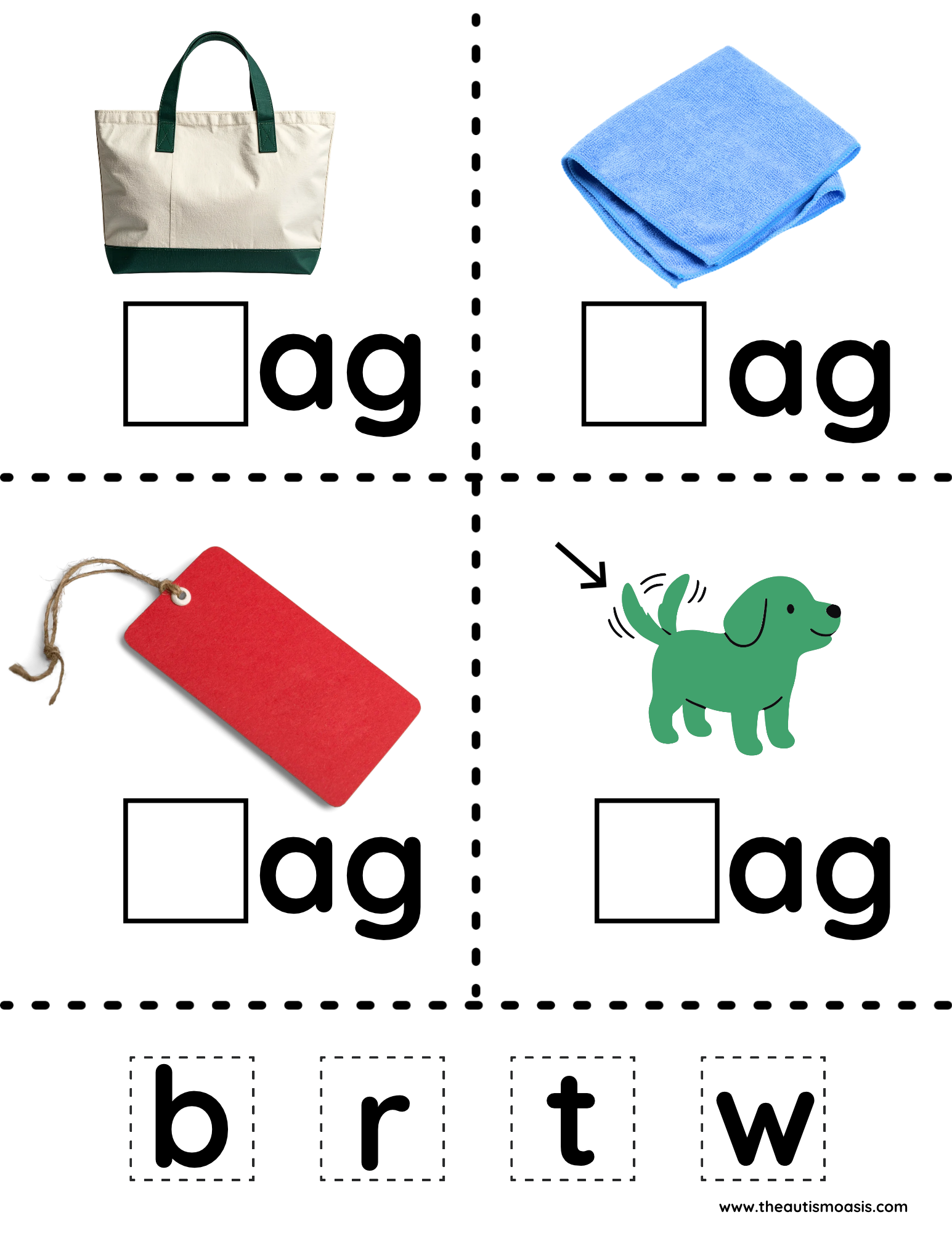
One of our recent mini-packets included a CVC word families activity in the -ag family: bag, rag, tag, wag. On the printed version, students cut out the letters b, r, t, and w and glue them into the boxes to complete each word. It's a great activity. But if your student uses a device, there's another way to do it.
Pull up the keyboard. Show them the picture of the bag. Model typing "b" and then say "bag" out loud. Move to the next picture, model "r," say "rag." Keep going. Same skill, same lesson. Just on the device instead of the worksheet.
For students who are drawn to the keyboard, this version can actually be more engaging than cutting and gluing. The letters are right there, the feedback is immediate, and the activity starts to feel less like schoolwork and more like something they're actually doing.
(Jen here: My daughter gravitates almost entirely to the keyboard now. It started with moments like this, small, low-stakes activities where she could explore letters and spelling without pressure. She got curious, and then she got good at it. I never would have predicted it, but the keyboard became one of her favorite parts of the device.)
Always Model First
Whatever literacy activity you try on the device, model it first. Press the letter yourself, say the word out loud, and let your student watch before they try. This is the same principle that runs through every post in this series: you're showing them what's possible before you ask them to do it themselves.
Don't worry if they're not ready to type independently. Any exposure to the keyboard in an academic context is useful, and you're laying groundwork even when it doesn't look like it yet.
Don't Forget the Curriculum
If you use our program, or any of our mini packets, it's worth taking a second look at the activities with fresh eyes. A lot of what we've built for worksheet-style work can be adapted for device use with a small shift in how you approach it. Instead of cutting and gluing, type. Instead of circling an answer, find it on the device. Instead of writing a word, spell it on the keyboard.
The worksheet and the device can work together. Try swapping one activity this week and see what happens.
That wraps up our Every Day with AAC series for AAC Awareness Month. We hope these four posts have given you a few new ideas for weaving AAC into the moments that already fill your days.
REFERENCES
Nonverbal Autism Homeschool enrollment is currently open!
Stay connected with news and updates!
Join our mailing list to stay updated on Nonverbal Autism Homeschool courses, special events and new blog posts. You'll also receive free curriculum, inspirational messages, autism parenting hacks and more!
We hate SPAM. We will never sell your information, for any reason.